

← Back to Products
Ubiquiti Protect Viewport
UniFi Protect

Ubiquiti Protect Viewport

★ 4.4VideoPrice tier $$$

The Protect Viewport is one of the easiest Protect picks to recommend when you want a clean live-view monitor that just stays on and works.

Affiliate disclosure: Product links may be affiliate links. If you buy through them, I may earn a commission at no extra cost to you.

Overview

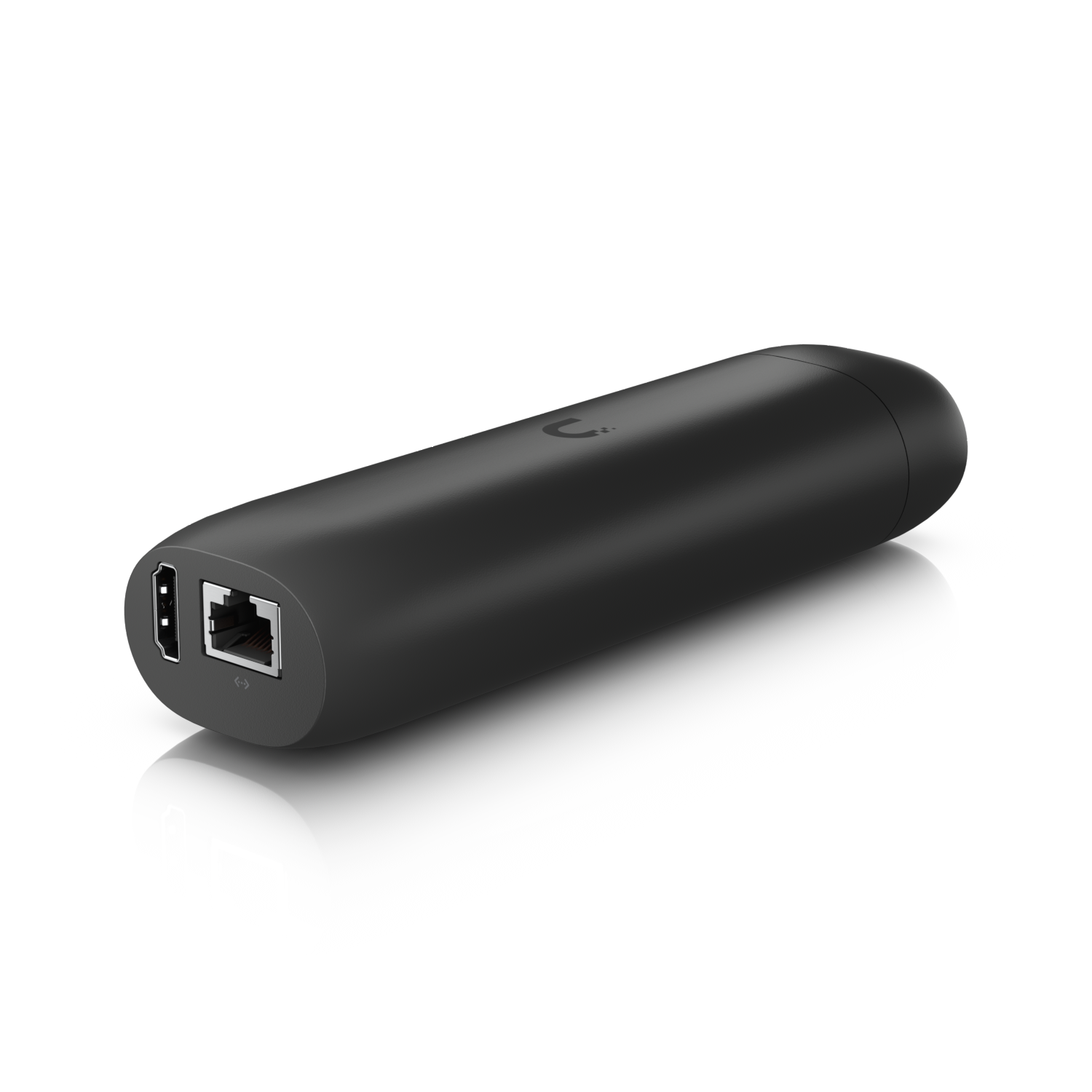
The Protect Viewport is a dedicated HDMI output device that connects to a monitor and displays live UniFi Protect camera feeds on that screen. It runs the Protect live view interface without needing a computer, browser, or ChromeCast device to drive the display.

It's designed for security monitoring stations, reception desks, or control rooms where a dedicated camera display needs to be always-on without tying up a workstation.

Why I Recommend It

Running Protect live view in a browser tab on a shared computer means that computer can't be used for anything else if the camera view needs to stay visible. The Protect Viewport gives that display its own dedicated hardware, freeing the computer for other work.

A Raspberry Pi with a browser pointed at the Protect web interface achieves something similar at lower cost, but requires its own setup and maintenance. The Viewport is a purpose-built device that handles this one job reliably without configuration effort.

Performance & Reliability

Displays multiple camera feeds in a configurable grid layout. Feed refresh rate and quality depend on the camera resolution and the network. The Viewport itself handles the decoding without introducing noticeable lag beyond what Protect's own web interface would show.

Purpose-built single-function hardware is more reliable for always-on duty than a general-purpose computer left on 24/7. There's no background software accumulating, no updates interrupting the display.

Adopt and configure through UniFi OS. View layout configurations persist across reboots. Power cycling returns it to the configured state.

Setup & Installation

Connect HDMI to the monitor, connect Cat6 for PoE power and network, adopt in UniFi OS, configure the camera layout and display preferences. Takes about twenty minutes to configure a multi-camera grid view.

Value for the Money

For a professional monitoring station where the display needs to be always-on and dedicated, the Viewport is the right tool. For a homeowner who wants to occasionally check cameras on a TV, an Apple TV app or Chromecast achieves similar results at much lower cost.

The commercial and small business use case is where this earns its price. Always-on dedicated camera monitoring without a full computer running continuously is a meaningful power and maintenance simplification.

Technical Specs

Core Details
Cameras Category
Connectivity
PoE, UniFi Protect Protocols
Use Case
UniFi Protect users who want reliable AI-powered security cameras. Best for
Technical Specs
$199.0 MSRP

Related Videos

Watch setup walkthroughs, product context, and companion guidance.

Browse videos
Can this tiny sensor make your home smarter?
Reviews

Can this tiny sensor make your home smarter?

Installation and review of one of the best Smart Sensors - the Aqara P2 Door and Window Sensor.

9:59 302 views

Configure the Ubiquiti Dream Machine Pro in 10 minutes!
Networking

Configure the Ubiquiti Dream Machine Pro in 10 minutes!

Basic configuration of the UDM Pro. Set up VLANs, wifi networks, and basic security in only 10 minutes.

9:24 1.2K views

Supercharge your home network with the UDM Pro
Networking

Supercharge your home network with the UDM Pro

Explore the benefits of using the Ubiquiti Unifi Platform in your smart home network and take a look at the initial setup of a Dream Machine Pro.

20:28 2.2K views
