

← Back to Products
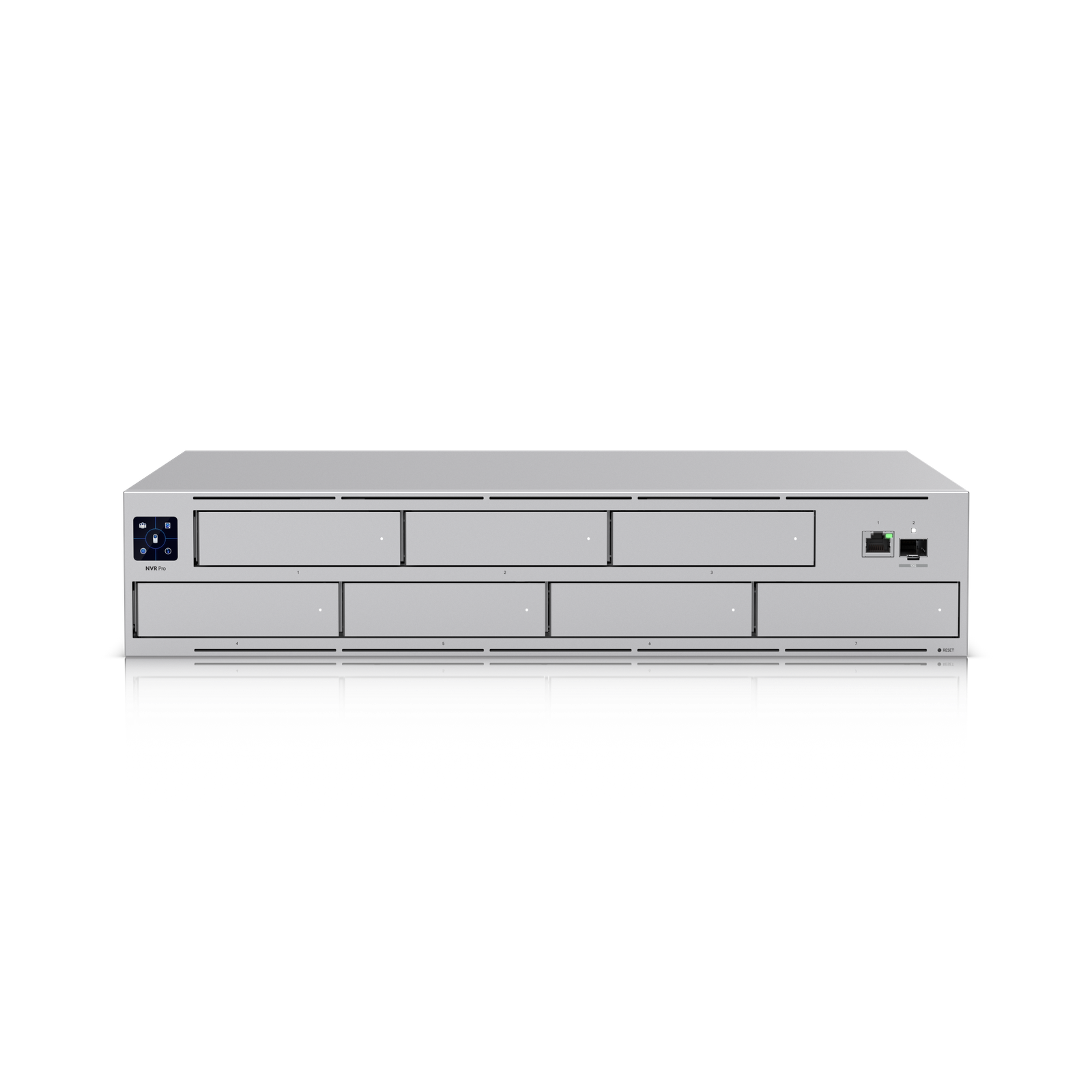
Ubiquiti Network Video Recorder Pro
UniFi Protect

Ubiquiti Network Video Recorder Pro

★ 4.8CamerasPrice tier $$$$

The Network Video Recorder Pro is one of the easiest Protect picks to recommend when you want recording retention, room to grow, and cleaner Protect administrat…

Affiliate disclosure: Product links may be affiliate links. If you buy through them, I may earn a commission at no extra cost to you.

Overview

The NVR Pro is a dedicated rackmount recording appliance for UniFi Protect. Unlike the UDM Pro which combines gateway and NVR functions, this device focuses entirely on camera recording and Protect management, which means its compute resources and storage capacity are not shared with routing tasks.

It supports more cameras and longer retention than a UDM Pro at equivalent storage, because it's not splitting processing time with network gateway functions.

Why I Recommend It

A UDM Pro handles routing, the UniFi controller, and Protect simultaneously. Add fifteen cameras at 4K and the UDM Pro's NVR performance starts to feel constrained. The NVR Pro separates that workload entirely, letting the gateway stay focused on routing while the NVR handles everything camera-related.

Large camera deployments benefit from this separation. The NVR Pro can handle significantly more concurrent camera streams before showing performance impact compared to running Protect on a UDM Pro.

Performance & Reliability

Handles thirty or more simultaneous camera streams without degradation when drives are correctly specified. AI detection events process without queuing delays that can appear on underpowered hardware. This is where it pulls ahead of the UDM Pro meaningfully.

Like the UNAS Pro, drive selection matters significantly. Surveillance-rated drives for continuous write workloads are required for long-term reliability. Consumer drives wear faster under sustained writing.

The NVR Pro requires a separate network controller for switching and routing management since it doesn't handle those functions. Plan the hardware split before deploying.

Setup & Installation

Rack-mount, install drives, connect to the network, adopt in UniFi Protect. Camera adoption happens through the NVR Pro rather than a UDM Pro. If migrating from an existing UDM Pro Protect setup, camera readoption is required.

Value for the Money

Makes sense when the camera count exceeds what a UDM Pro comfortably handles, typically around fifteen to twenty cameras at high resolution. Below that threshold, the UDM Pro's combined approach is more cost-effective.

For commercial deployments with thirty or more cameras and long retention requirements, the NVR Pro is the right dedicated hardware. The per-camera recording cost drops as the camera count grows.

Technical Specs

Core Details
Cameras Category
Connectivity
Ethernet, UniFi Protect Protocols
Use Case
UniFi Protect users who want reliable AI-powered security cameras. Best for
Technical Specs
$499.0 MSRP

Related Videos

Watch setup walkthroughs, product context, and companion guidance.

Browse videos
Design the Ultimate Smart Home from Scratch! Part 6 - Security
Design

Design the Ultimate Smart Home from Scratch! Part 6 - Security

Part 6 of Designing the Ultimate Smart Home series. Discussion of cameras, sensors, and other security measures to protect your smart home.

5:38 448 views

Supercharge your home network with the UDM Pro
Networking

Supercharge your home network with the UDM Pro

Explore the benefits of using the Ubiquiti Unifi Platform in your smart home network and take a look at the initial setup of a Dream Machine Pro.

20:28 2.2K views

Configure the Ubiquiti Dream Machine Pro in 10 minutes!
Networking

Configure the Ubiquiti Dream Machine Pro in 10 minutes!

Basic configuration of the UDM Pro. Set up VLANs, wifi networks, and basic security in only 10 minutes.

9:24 1.2K views
