

← Back to Products
Ubiquiti G6 Pro Turret
UniFi Protect

Ubiquiti G6 Pro Turret

★ 4.9CamerasPrice tier $$$$

The G6 Pro Turret earns a recommendation because it fits especially well when you want premium fixed surveillance with stronger low-light performance than the r…

Affiliate disclosure: Product links may be affiliate links. If you buy through them, I may earn a commission at no extra cost to you.

Overview

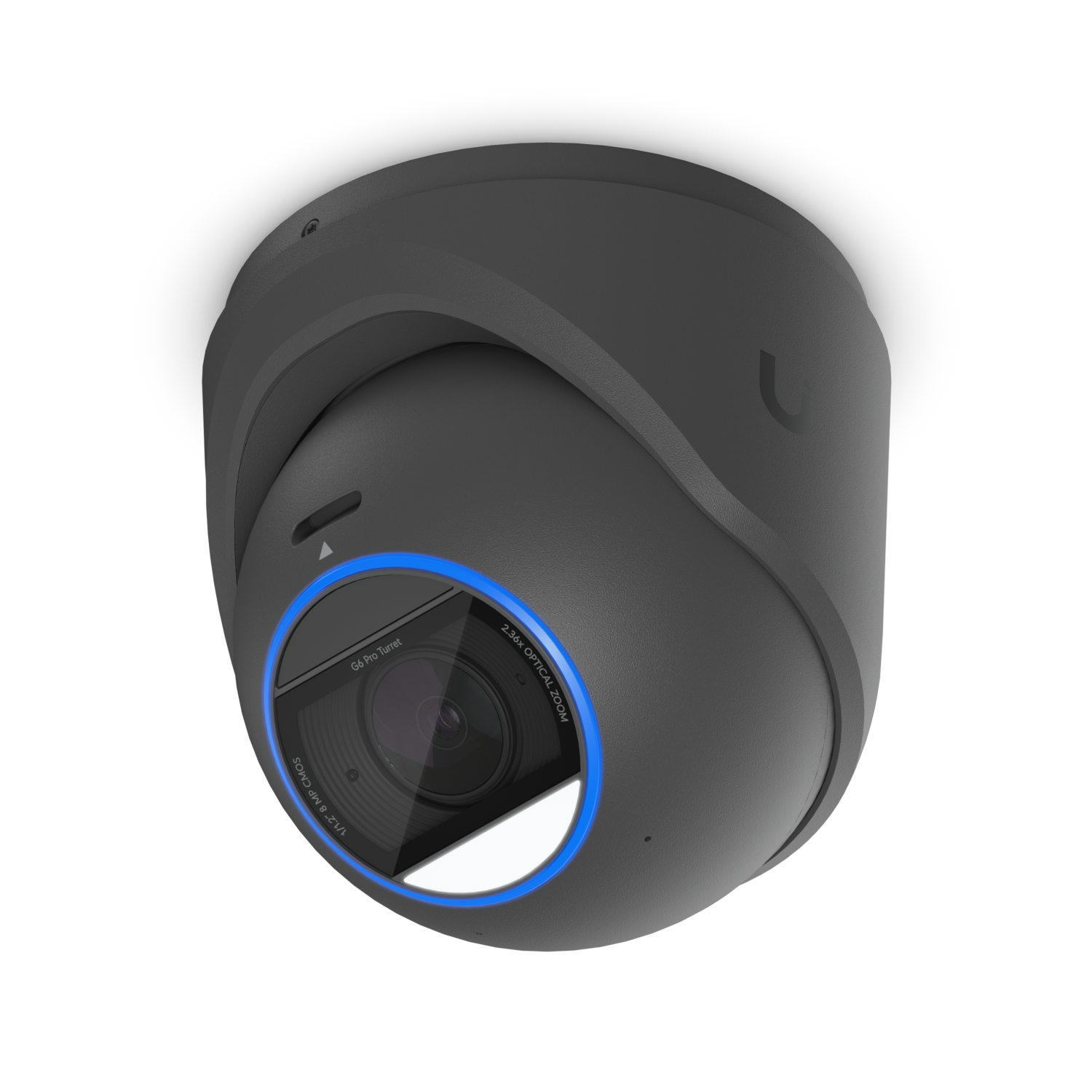
The G6 Pro Turret is a 4K camera with a ball-in-socket turret mounting that lets you adjust the viewing angle after installation without removing the camera from its mount. The Pro designation means enhanced low-light performance compared to standard G6 cameras.

It's designed for tight spaces and ceiling mounts where a dome would be too wide or a bullet would stick out too far. The turret form factor keeps the profile compact while still giving directional adjustment.

Why I Recommend It

Domes have fixed angles once mounted because adjusting a dome requires repositioning the entire housing. The turret ball-joint lets you shift the camera's field of view by a few degrees after you've already closed up the ceiling, which is genuinely useful when you discover during testing that the angle isn't quite right.

Compared to the standard G6 Turret, the Pro version's larger sensor handles dim corridors, parking structures, and exterior overhangs without losing detail the way smaller sensors do in transitional lighting conditions.

Performance & Reliability

4K resolution with the Pro low-light sensor handles challenging indoor-outdoor threshold lighting better than any non-Pro G6 camera. Color is accurate in mixed lighting that would shift the white balance on cheaper cameras. AI detection with the AI Key or built-in Pro processing is reliable.

The turret ball joint is a mechanical element that can loosen over years of vibration, particularly in HVAC equipment rooms or near heavy machinery. Periodic angle checks are sensible in those environments.

IP55 rated. Appropriate for covered exterior locations and indoor use. Not suitable for direct rain exposure.

Setup & Installation

Mount the base, run Cat6 for PoE, adopt in Protect, adjust the ball joint to the desired angle. The angle adjustment happens after adoption so you can use the live feed to dial in the exact coverage area.

Value for the Money

The Pro line commands a price premium over the standard G6 cameras. In locations where lighting is challenging and you need accurate footage for identification purposes, that premium delivers real value.

In bright, well-lit environments where the standard G6 performs adequately, the Pro's added cost is harder to justify. Use standard G6 cameras for straightforward indoor coverage and reserve Pro hardware for genuinely difficult lighting conditions.

Technical Specs

Core Details
Cameras Category
Connectivity
PoE, Ethernet, UniFi Protect Protocols
Use Case
UniFi Protect users who want reliable AI-powered security cameras. Best for
Technical Specs
$479.0 MSRP
8MP 3840 x 2160 (16:9) Resolution
30 FPS Frame rate
Wide: H 113.8°, V 61.9°, D 134°; Tele: H 45.5°, V 25.8°, D 52° Field of view
40 m (131 ft) Night vision
⌀117.2 x 116.5 mm (⌀4.61 x 4.59") Dimensions
IP66 Weatherproofing

Related Videos

Watch setup walkthroughs, product context, and companion guidance.

Browse videos
Design the Ultimate Smart Home from Scratch! Part 6 - Security
Design

Design the Ultimate Smart Home from Scratch! Part 6 - Security

Part 6 of Designing the Ultimate Smart Home series. Discussion of cameras, sensors, and other security measures to protect your smart home.

5:38 448 views

Supercharge your home network with the UDM Pro
Networking

Supercharge your home network with the UDM Pro

Explore the benefits of using the Ubiquiti Unifi Platform in your smart home network and take a look at the initial setup of a Dream Machine Pro.

20:28 2.2K views

Configure the Ubiquiti Dream Machine Pro in 10 minutes!
Networking

Configure the Ubiquiti Dream Machine Pro in 10 minutes!

Basic configuration of the UDM Pro. Set up VLANs, wifi networks, and basic security in only 10 minutes.

9:24 1.2K views
